

It’s been six months since we’ve had an “AI bonanza” moment. The last time this played out around late December/early January when a lot of developers and operators spent more time with Claude Opus 4.5 and ClawdBot.
In the span of a week, we saw the first meaningful step up from SpaceXAI with the Cursor-trained Grok 4.5 model, the release of OpenAI’s new large training runs (without significant government interference), and Meta finally releasing something usable (if not too late). Surprisingly, we also had Apple launch a lawsuit against several OpenAI employees, claiming that they stole a significant amount of technical information related to wearables.
This is a good moment to reassess the current positioning for OpenAI, Anthropic, SpaceXAI, Google, and Meta, with an eye on where things are headed in the second half.
OpenAI
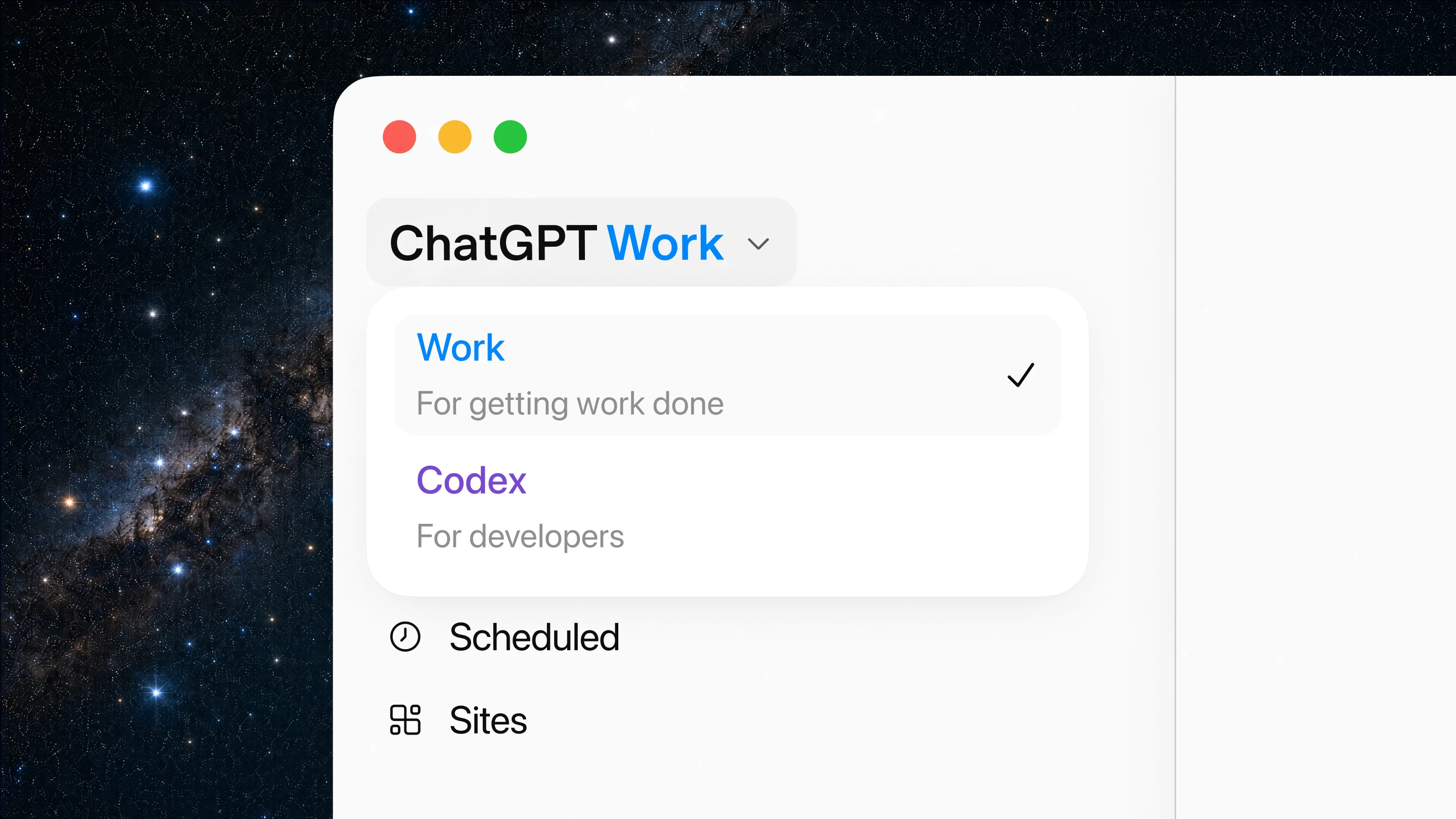
Introducing ChatGPT Work, an agent in ChatGPT that helps you take on more ambitious tasks. It can gather information across your apps and workflows to create finished materials like sheets, slides, docs, and web apps, and stay with complex projects for hours by breaking them into smaller steps and completing them independently.
With Codex technology built-in, ChatGPT can now move beyond answering questions to getting real work done across web, mobile, and desktop. More than 5 million people use Codex every week. Although it began as a coding agent for developers, more than 1 million people now use it for work outside software development, showing how its capabilities can support a wider range of tasks.
To better manage these tasks, ChatGPT Work is powered by our latest frontier model, GPT‑5.6, which is also rolling out today. GPT‑5.6 makes ChatGPT state of the art at reasoning through multi-step tasks and creating materials that follow your templates and reference files.
The best way to learn how to use ChatGPT Work is to give it a task you already know well: analyze a month-end budget variance, turn source materials into a marketing campaign brief, or prepare for a sales meeting. You can follow its progress, answer questions, change direction, and approve important actions.
You can even ask ChatGPT Work to take on entire workflows with a single request. For example, it can turn customer research into a campaign brief, use that brief to create marketing assets, and adapt those assets for different markets while carrying context through every step.
Even when you’re away from your computer or phone, ChatGPT Work can keep projects moving forward with Scheduled Tasks. For example, it can independently turn new messages from Microsoft Teams and Slack into updated docs or slides, then share important changes with your team.
Surprising no one, OpenAI launched the upgraded version of their Codex developer tool that has now been expanded into agentic workflows for professionals (Work) and developers (Codex). This is a perfect showcase for the release of 5.6, but it’s also a good illustration of the peculiar product choices made by the team.
Rather than offer something similar to the “Claude super-app”, the team killed off the Codex and ChatGPT standalone applications, essentially merging them. The trick is that the new desktop app has very little ChatGPT going on, with the UI having no separate section to review your historical chats and only opening a very small window overlay to use it. This basically means that all users are pushed towards the web or mobile version to use ChatGPT for their regular questions.
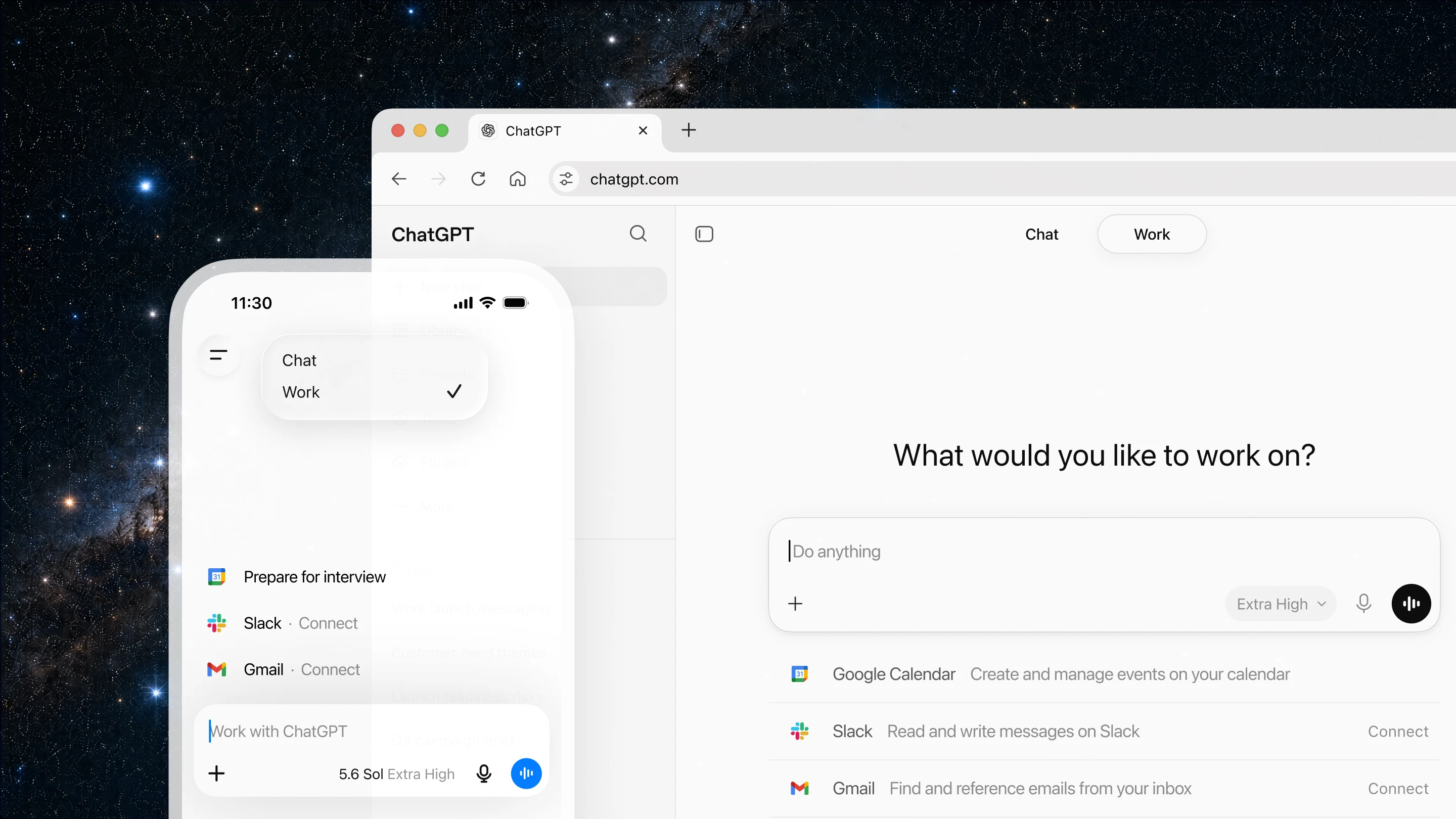
For those who will use the desktop app for their serious business, we have two new windows for Work and Codex, which don’t seem to change much of anything in the interface.
ChatGPT Work is designed to keep tasks moving forward wherever you are. You can ask it to start a task from your phone, review a draft on the go, or check the status of a longer-running workflow between meetings. When you return to your desk, you can pick up the same work on the web.
For an even more powerful experience, the ChatGPT desktop app now goes further. On desktop, ChatGPT can use your local files and apps to get work done. For web-based work, ChatGPT’s new built-in browser lets it bring in websites, tools, and online files, giving you one place to move work forward.
Starting today, the Codex app is merging with the new ChatGPT desktop app. Codex remains the same powerful coding agent for developers and technical professionals, now with new capabilities(opens in a new window) across core workflows, including inline editing within diffs, pull request review in the side panel, faster computer use (powered by GPT‑5.6), and support for multiple repositories in a single project.
For the mobile version of the app, we also seem to be focusing on offering only Chat and Work interfaces, essentially pulling away from the cloud agents product focus.
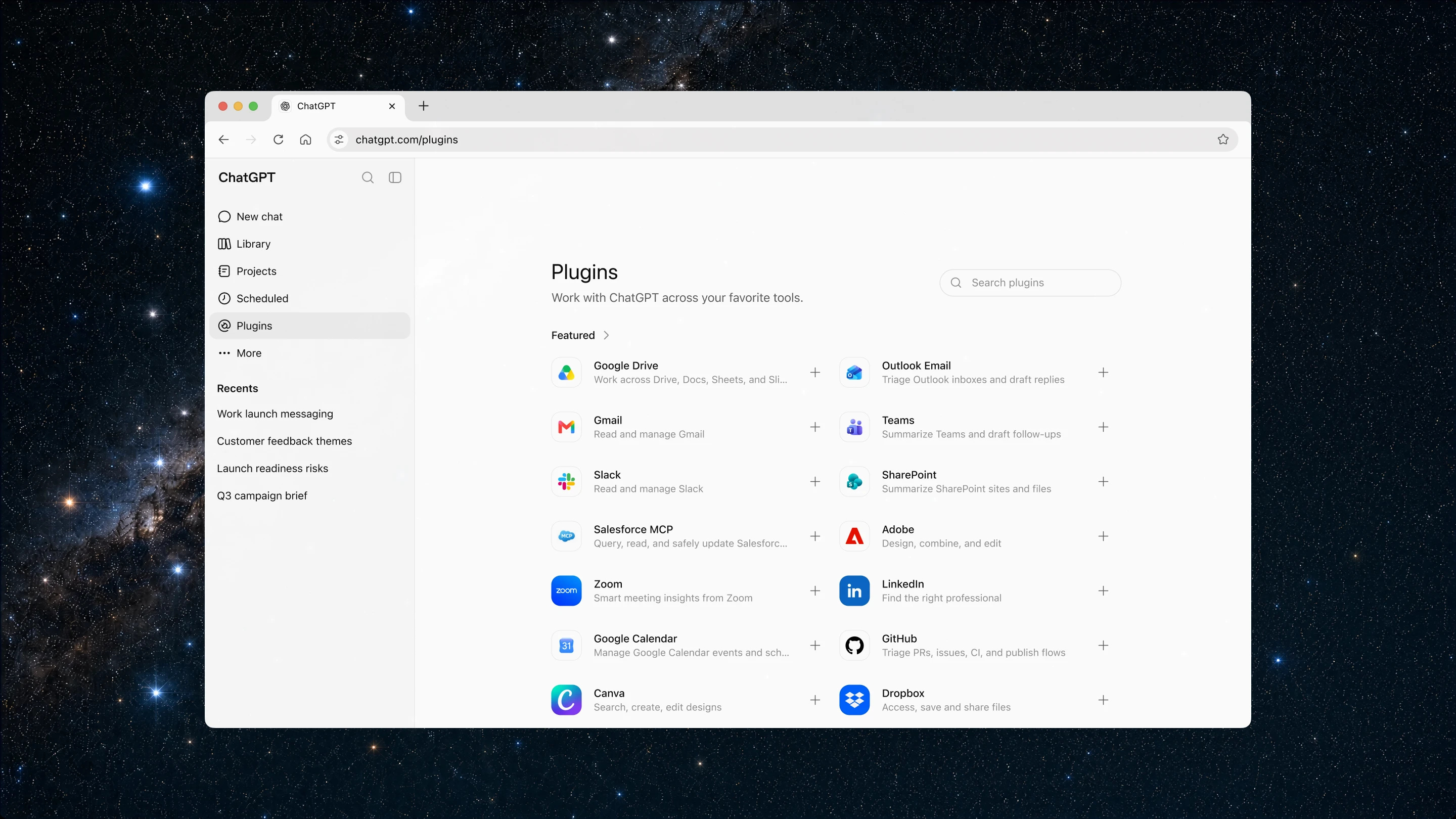
We’re also introducing Sites in ChatGPT in public beta. With Sites, you can turn your work or ideas into an interactive site or web app and share it with your team or publicly through a URL. Sites are useful when you want to create things like live dashboards, project trackers, launch calendars, prototypes, internal portals, and interactive reports. You can test the Sites you build right inside ChatGPT and bring fresh web context into your project, too. ChatGPT can also update them as the underlying information changes.
Picking up on the Google and Anthropic implementations in the same vein, the new projects created in Work can be showcased across a variety of surfaces, including custom web pages to share internally or with customers.
ChatGPT Work can help take repetitive tasks off your plate, freeing you up for more impactful work.
Scheduled Tasks let you ask ChatGPT to perform an action once, repeat it on a schedule or when an event occurs, or monitor for changes over time.
Scheduled Tasks can use your connected apps and browser to:
Review new Slack updates each week and refresh a recurring meeting agenda.
Check websites and dashboards each morning, summarize what changed, and send a report.
Monitor new customer feedback and turn recurring themes into prioritized product ideas.
Update a presentation when new feedback arrives by email.
You remain in control of how ChatGPT works with you. You decide what it can access, when it should check in, and when it needs your approval before taking action. You can review progress and steer the work as priorities change.
Work also implements automation (cron jobs) more consistently as workflows, making the early magic of ClawdBot now accessible to the mainstream.
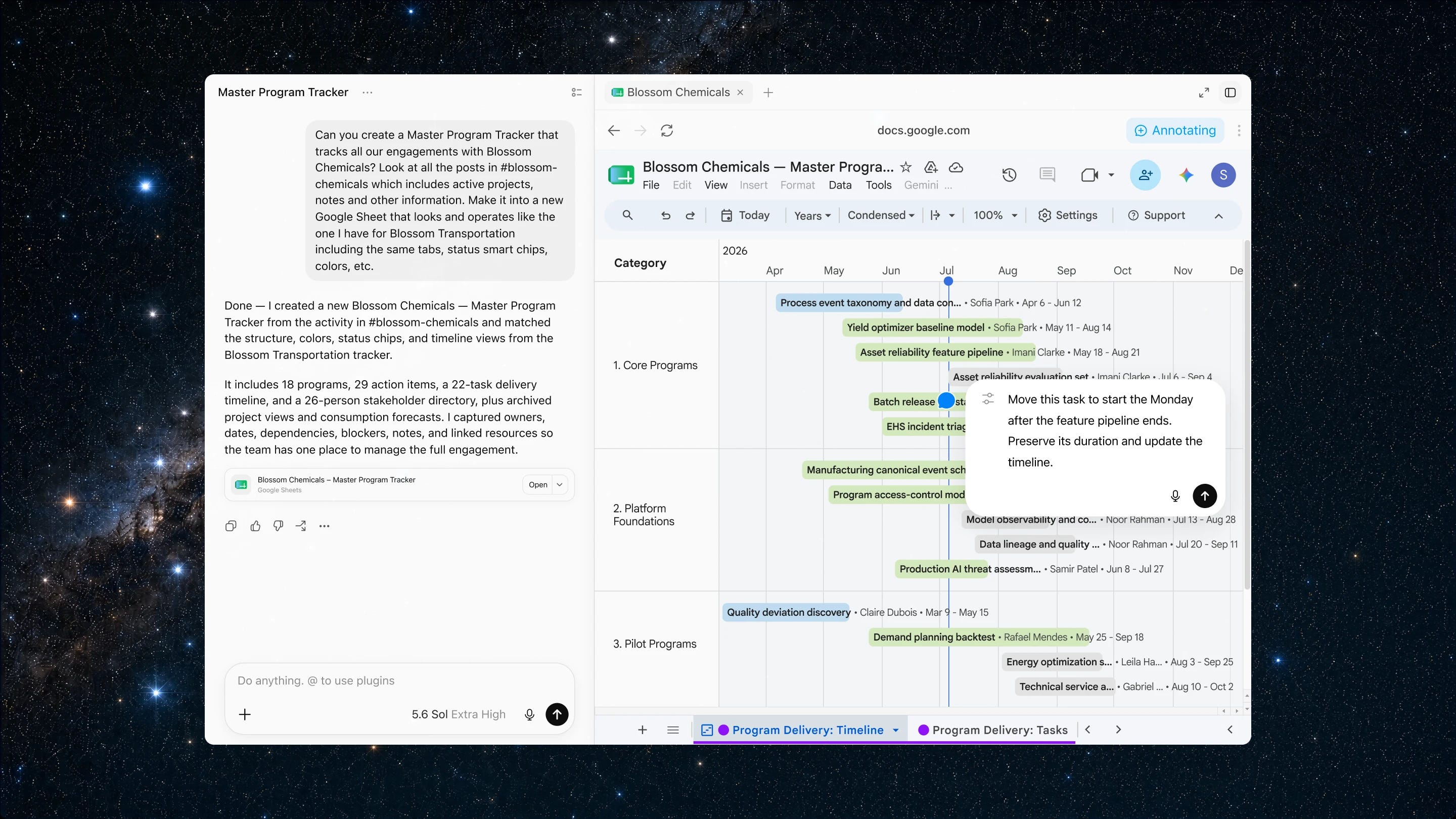
On desktop, ChatGPT now includes a built-in browser to help you gather information online, use web-based tools, and refine web-based work in one place.
You can ask ChatGPT to research a market, compare sources, pull information from websites, or open and refine files from Google Workspace and Microsoft 365 inside the app. It can use the browser to bring in fresh context, take steps across web pages, and keep the work moving while you review and guide the result.
On desktop, Computer Use lets ChatGPT use your computer on your behalf to execute tasks in the background across your apps, tools, and browser—clicking, typing, and moving files where they need to go. You can use it for a one-time task or as part of a Scheduled Task when recurring work includes steps on your computer.
We are also updating our Chrome extension to make it possible to use ChatGPT directly in Chrome’s sidebar. These capabilities build on what we learned from Atlas and from the users who helped us understand how agentic tools can make browser-based work more useful. We’ll begin sunsetting the standalone Atlas browser, and will share information with users about how to transition to ChatGPT.
This includes an extended application of computer use, significantly extending the capabilities of the models to get context in your work applications, either through plugins, MCP servers, or just by looking at stuff on your screen. The key to making this all work is GPT-5.6 Sol, their new frontier model.
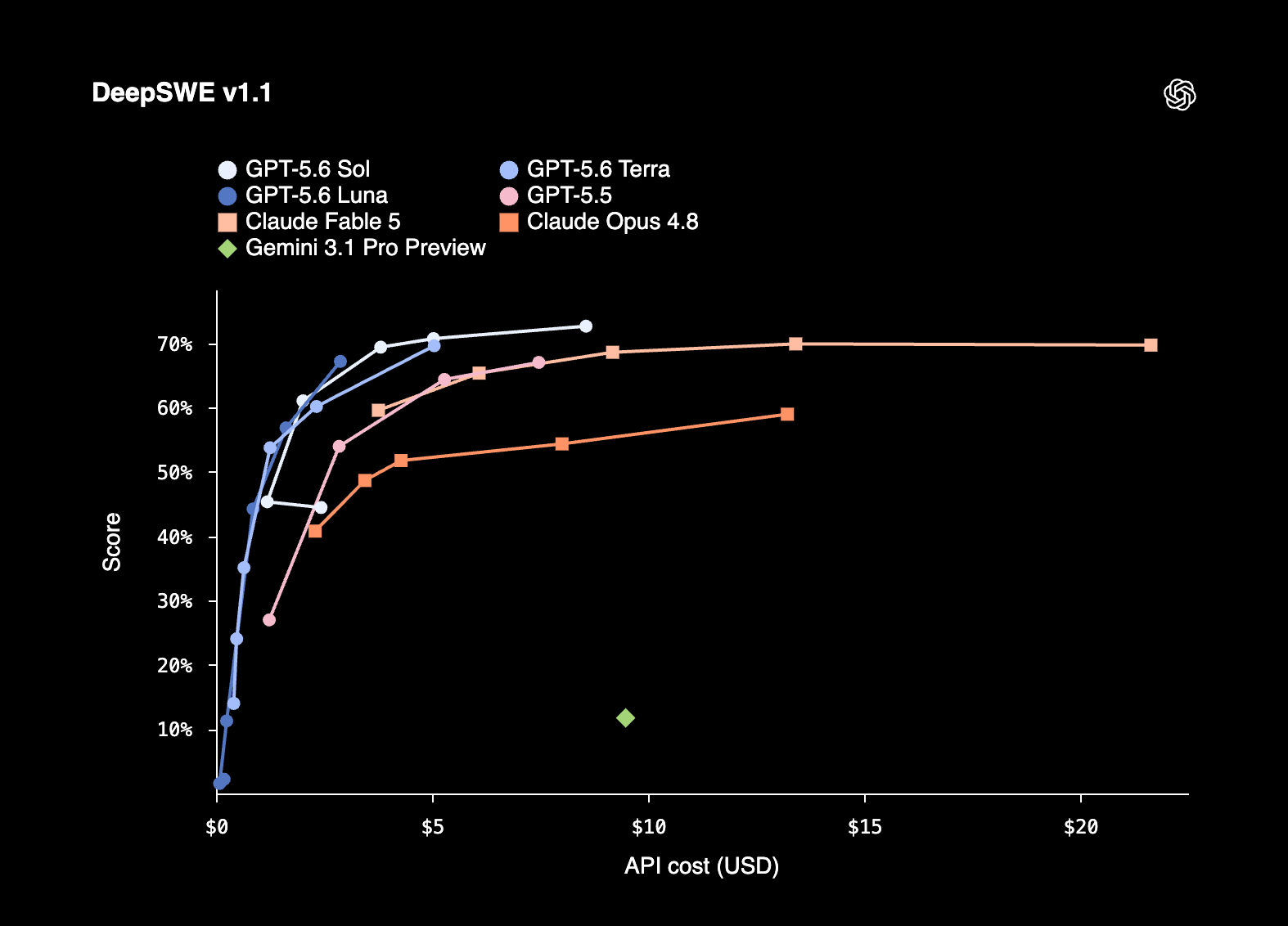
GPT‑5.6 Sol sets a new standard for both intelligence and efficiency, achieving state-of-the-art results across coding, knowledge work, cybersecurity, and science while outperforming previous and competing frontier models with fewer tokens and at lower estimated cost. The result is stronger performance per dollar: more successful work for the same spend, or comparable results at a lower total cost. We also introduce a new way to accelerate the most demanding work:
ultrais our highest-capability setting, coordinating multiple agents across parallel workstreams to finish complex tasks faster. Stronger computer use and design judgment make GPT‑5.6 Sol our most polished collaborator yet, helping it inspect, refine, and deliver ready-to-use results.We trained GPT‑5.6 to get more useful work from every token. On Agents’ Last Exam(opens in a new window), an evaluation of long-running professional workflows across 55 fields, GPT‑5.6 Sol sets a new high of 53.6, eclipsing Claude Fable 5 (adaptive reasoning) by 13.1 points. Even at medium reasoning, it beats Fable 5 by 11.4 points at roughly one-quarter the estimated cost. That efficiency extends to smaller models, which are essential to making intelligence more abundant and affordable: GPT‑5.6 Terra and GPT‑5.6 Luna outperform Fable 5 at around one-sixteenth the cost. On the Artificial Analysis Intelligence Index(opens in a new window), a broad measure of intelligence spanning agentic work, coding, scientific reasoning, and general capabilities, GPT‑5.6 Sol with max reasoning comes within one point of Fable 5 while completing tasks in 61% less time at roughly half the estimated cost.
It’s interesting to see how bad the impact of Anthropic fumbling the launch of Mythos/Fable has been. They were a month ahead with the strongest model in the industry (and arguably the first real leg up in recent months), but due to mismanaging their relationship with the federal government and the subsequent temporary withdrawal of the model, they missed out on actually capitalizing on the opportunity.
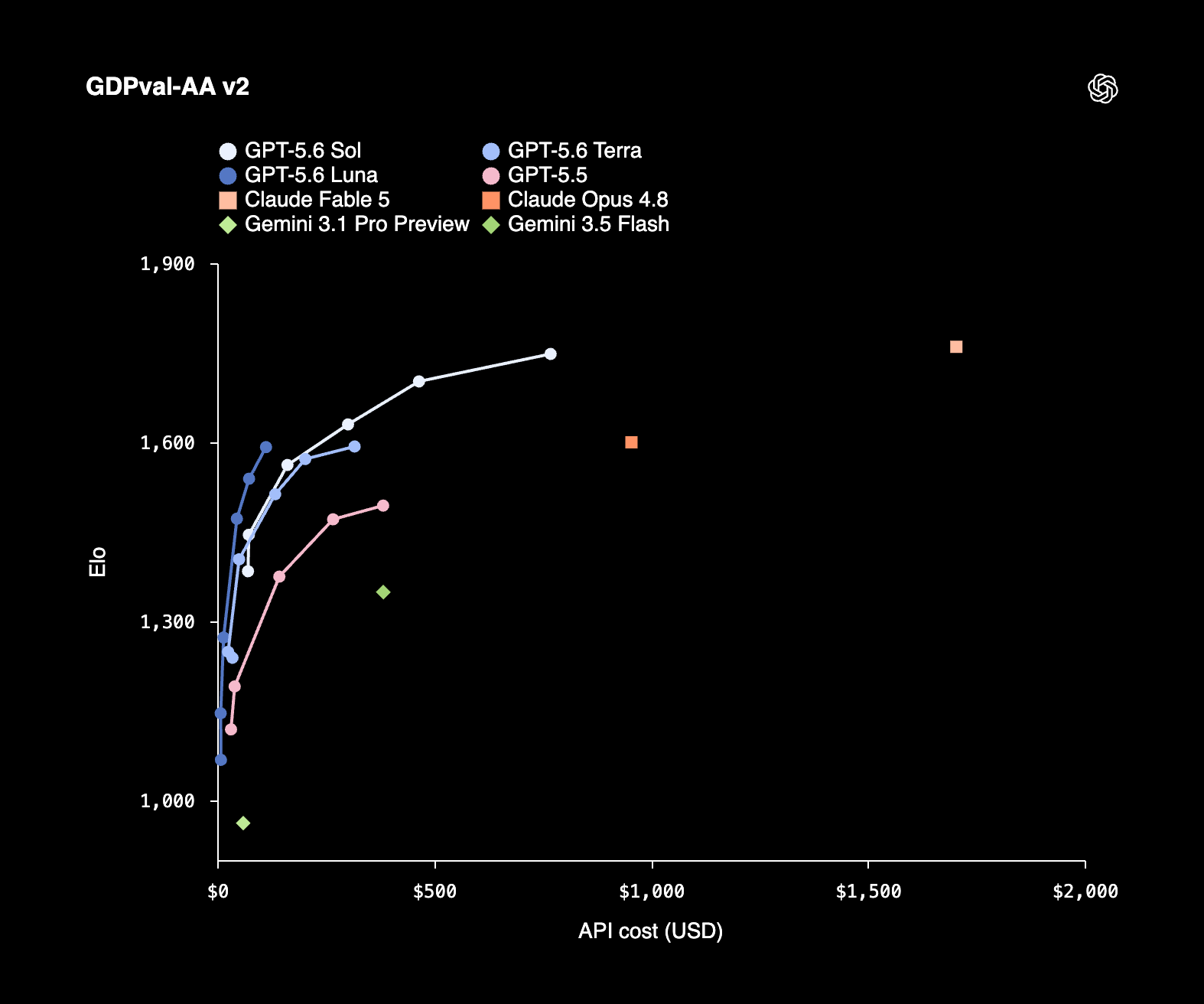
GPT-5.6 is benchmarking at similar performance levels to Fable, while coming in at a significantly lower cost due to efficiency improvements.
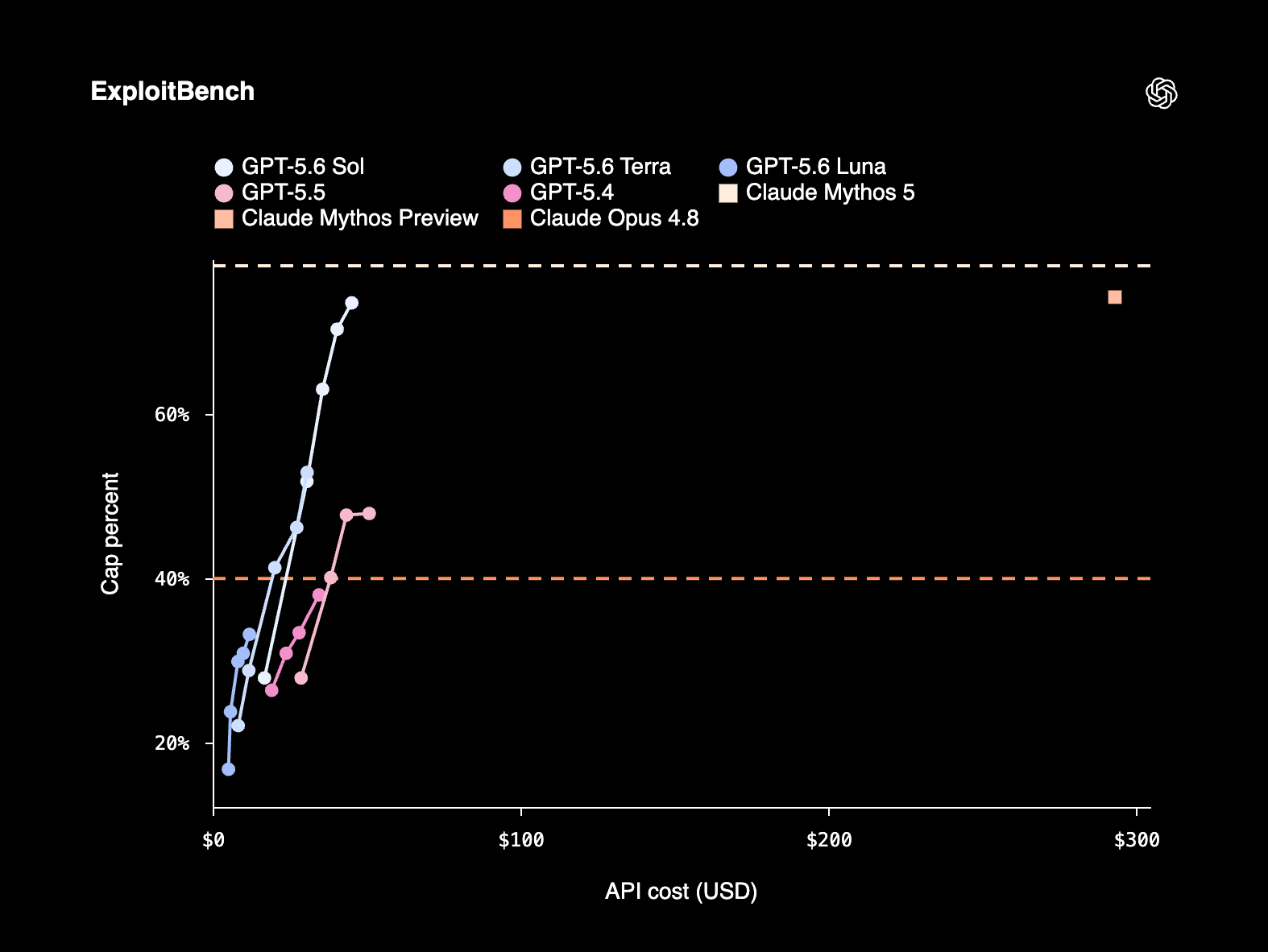
More embarrassingly, it appears to be catching up to Mythos-level utility for cybersecurity tasks, at 20% of the cost for the same workload. It also launched without the ridiculous “30 day retention policy” that Anthropic instituted for Fable, which has delayed many rollouts across enterprises.
OpenAI sits at an interesting place. After the misguided play towards the consumer space last year (for which Sam should’ve taken full responsibility), the company refocused on delivering the best possible model efficiently with the compute that they have. The last part is critical, since it sets them apart significantly from Anthropic, who are struggling both in terms of available compute and the model architecture when it comes to tokens generated.
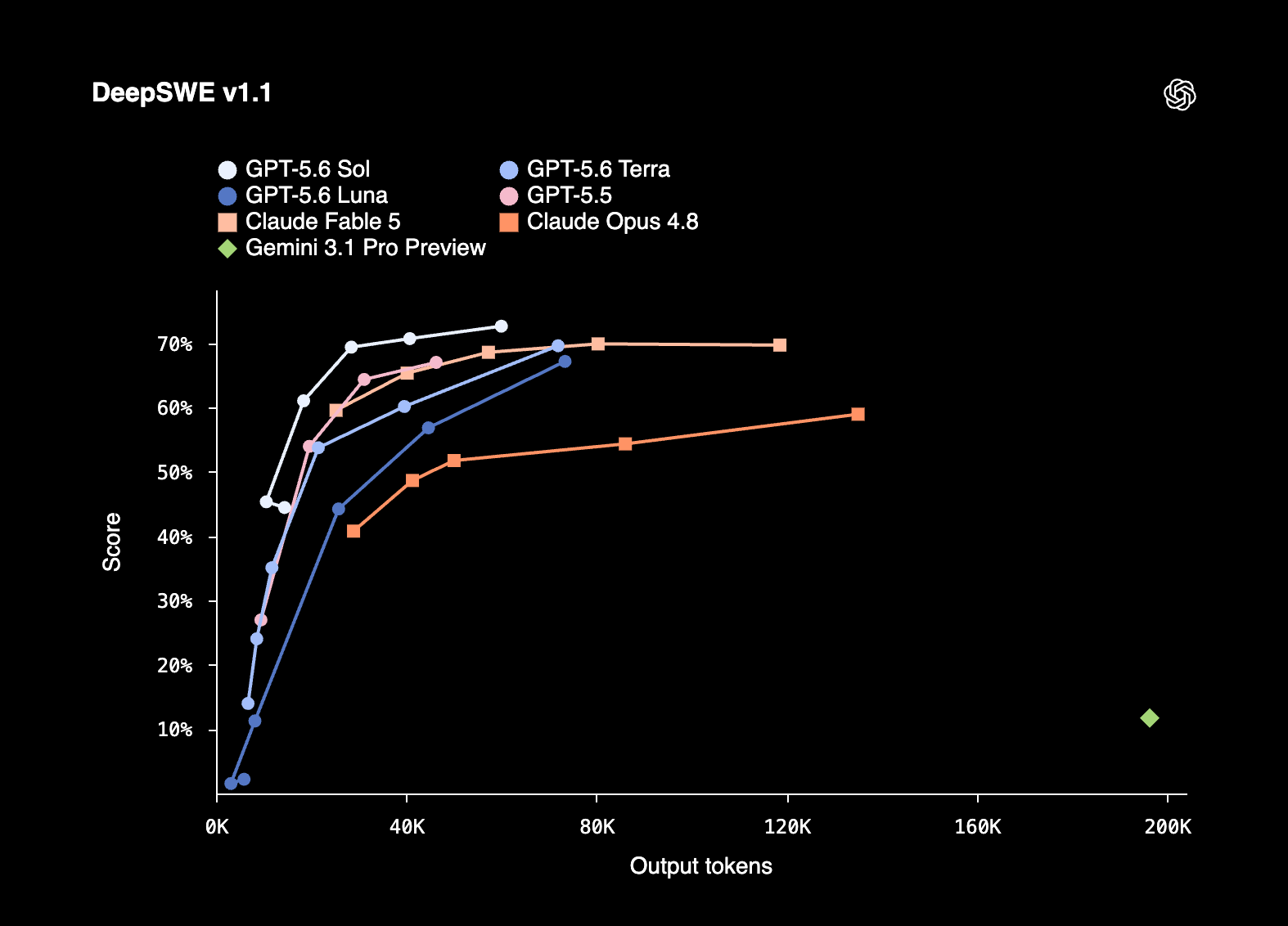
If we look at DeepSWE, the most accurate coding benchmark currently on the market, Fable is barely showing improved outcomes on its two highest effort settings, while consuming twice the tokens for its Max version.
This puts OpenAI in a pretty good place in terms of model performance, particularly now that the company has a meaningful answer to Cowork.

Whether they can accelerate growth by capturing new demand or will essentially be pushing for the displacement of existing Anthropic usage is a completely different topic. This comes back to the question of how quickly they can take the right product decisions and put them into place.